
































































Entertainment
34 servicesYour media, movies, TV, music, books, photos, and the servers that stream them.
RadarrSonarrPlexJellyfinJellyseerr / OverseerrSABnzbd+28 more
Step inside
In the corner of the room
Servers, storage, the network
Present and accounted for
The whole stack
Entertainment · 34
Radarr, Sonarr, Plex, Jellyfin and the rest of your library, connected directly.
Command Centre · 30
Proxmox, your NAS, Home Assistant, and your network: AdGuard, Pi-hole, Cloudflare, UniFi.
Everything you run, connected directly to one native app.
Entertainment 34
Command Centre 30
Your media, the homelab that runs it, and now your books. Kept apart so 64 services never cram onto one screen, connected directly and managed honestly.
Your media, movies, TV, music, books, photos, and the servers that stream them.
The homelab itself, compute, network, storage, smart home and the edge.

Your books and audiobooks, with BookOrbit and Grimmory in one library. EPUB and PDF open in a native reader, audiobooks keep playing in the background, and you can find and request the next one through BookOrbit. Don't run a book server? Switch it off in Settings.
When a download stalls, the Doctor finds it, explains why in plain English from your services' own evidence, and offers the fix in one tap.
Play films and episodes from Jellyfin, Emby and Plex without leaving the app, with your choice of audio and subtitles, AirPlay and Picture in Picture.
Invite someone by QR code, link or file to browse and request through their own Seerr account, while your services stay behind your PIN. Setting it up needs Pro; joining is free.
Give a service a local and a remote address. It prefers your fast LAN at home and falls back when you are out, switching automatically.
No account, no analytics, no cloud in the middle. Your keys stay encrypted on your device and talk only to the servers you run.
The same app on all three. On an Apple silicon Mac it gets a sidebar, layouts that fit the window, wider library grids and keyboard shortcuts.
A small companion you run on your own server. Pair your phone to it once, and Quartermaster reads your containers, stacks and updates the way they really are. Companion’s own dashboard can start, stop and update them too, once you give it Docker write access.
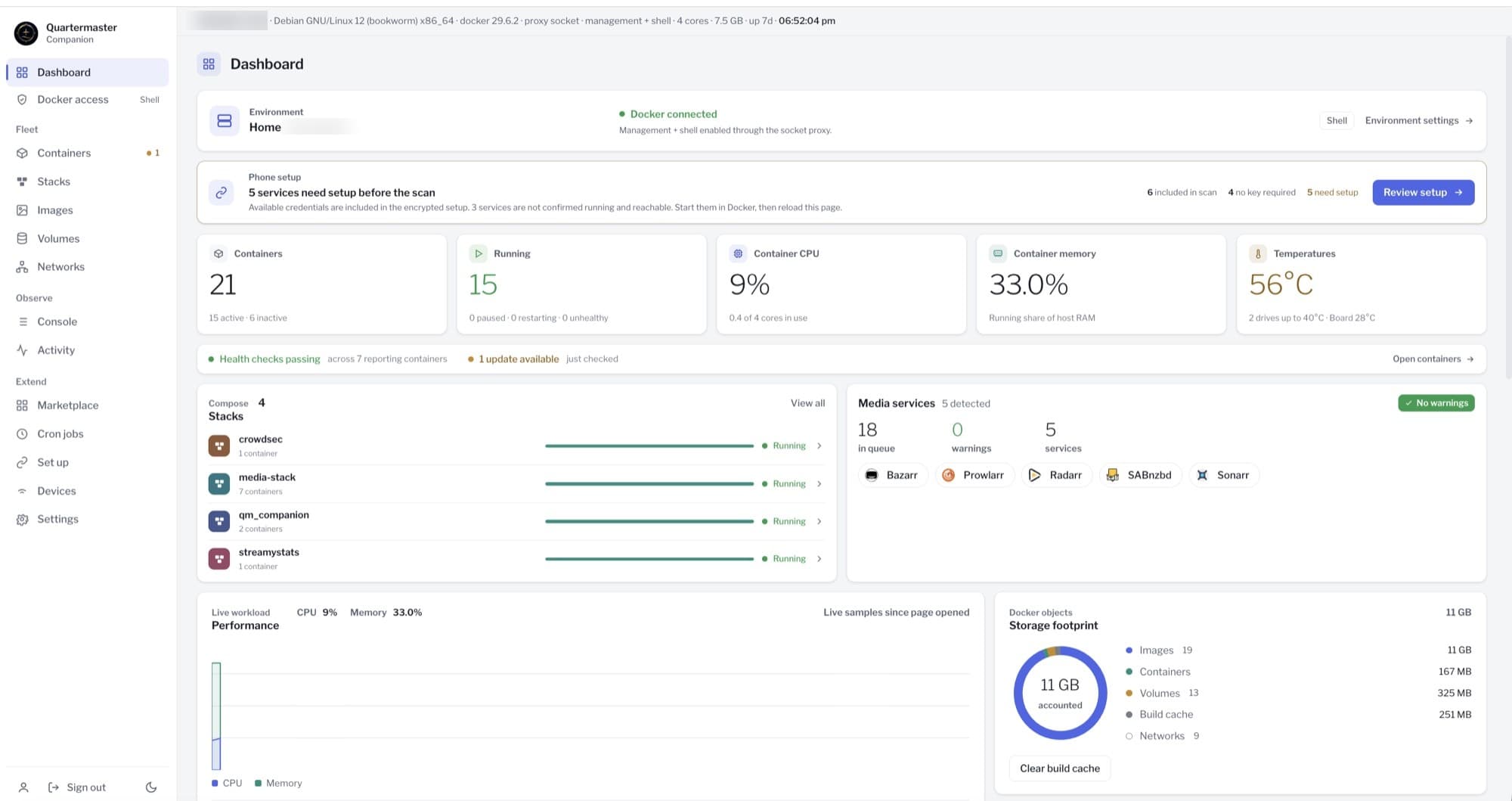
A fresh install can take your whole service list straight from Companion: scan a one-time code, check every address, and skip the setup evening. The free plan runs one service at a time, so the whole stack comes into its own on Pro.
Pair once and watch your server live: containers, stacks, Docker volumes, available updates and recent activity. The app only reads. To start, stop or update a container, use Companion's own dashboard on your server.
It lives in your phone's keychain and nowhere else. Revoke it from your server and the phone is cut off at once.
Match five words on your server to approve it. The link only reads, so the phone can't change a container.
After setup the app talks straight to your server, over your home network or your Tailscale. No relay, no keys to type.
QM Companion runs on your own server alongside Docker, on your home network or over Tailscale. You host it, you hold the keys.
Out now
A new Entertainment Home you watch from, Command Centre layouts built around how you check your stack, and QM Reader, a third world for your books and audiobooks. Plus new alerts and five new connections.
See what's new in 1.3Also in beta: Quartermaster on Apple TV, with Oracle, its own player for Dolby Vision, TrueHD and DTS. See the Apple TV app
 Grafana
 Uptime Kuma
 PeaNUT
 Pulsarr
 Grimmory
services supported
worlds, kept apart
on the App Store
ratings and counting
accounts, trackers, backends
Unedited, straight from the App Store. Hover a row to hold it still.
Amazing app that keeps getting better
Purchased early and joined TestFlight where I watched the dev implement user requests faster than I had ever seen. Now enjoying the official version and remain floored by all the added functionality. Best app for a homelab
Gets everything
Love how I can manually browse for downloads through seer and be able to monitor everything on my server. Thank you.
Amazing
The entire media center in my pocket :-)
Great app
It has it all, no ads. Very clean UI.
Baller
This app is so sick. Being able to monitor my stack in a single pane of glass is next level. This app deserves a lot more recognition!
Simply a masterpiece
Outstanding support and developing on this one! This is my new go to for monitoring and managing my stack.
Awesome app just needs more features
Can’t wait to see what the implement next so far it is an amazing app. Looking forward to future update updates!
At last
Finally, an all-in-one app to manage my homelab, both the media-center side and the other programs. 10/10
Translated from Spanish
Clean UI
Love the UI and the amount of services you can add in.
So far so good!
I just recently set it up and while I haven’t done deep config, the early results are great. I’m not diving into the browser to fix everything and other tools I have only addressed certain features. This may be the answer I’ve been looking for. I may go back and update this later but so far so good.
Great First Look
Just starting using app, but it’s great so far and the developer is extremely responsive. Keep up the great work!!
Useful and beautiful!
Finally a genuinely useful app that lets us run the server from one place! There are loads of integrations. And above all, the UI is worthy of iOS.
Translated from Italian
The most comprehensive homelab mobile panel
This is for sure the most comprehensive homelab mobile panel on the market. It implements so many applications across in Selfhosted and cloud infrastructure and media stack you can imagine. And the developer is dedicated to implement even more with every release. Definitely recommend.
Worth it
Initially I was hesitant to pay for the pro version but after using it for about a month, it’s well worth it. This app surpasses all my expectations, and the updates keep coming with new features the community asks for. I’ve been in the process of simplifying my homelab and this app gives me the ability to do the majority of my house cleaning tasks in one place.
Definitely convinced
A unique app that brings absolutely everything you need into one place, and blends information from every source intelligently and elegantly. No other app was conceived like it. Very ergonomic, easy to set up the way you want, and optimised for excellent visual clarity. It made me abandon all the others. A big thank you to the developer for the work, the concept, and how effectively it’s been executed. One suggestion: a French translation of the interface would be welcome now. Keep it up!
Translated from French
Absolute gem!
Incredibly beautiful and helpful app to show everything that's going on in my home lab. Only been scratching the surface of this app considering the many things it can do.
Unreal! Honestly the best.
Absolutely brilliant app! I’ve been really impressed with Quartermaster so far. The app is clean, fast, and incredibly easy to navigate. Everything feels well thought out, and it’s obvious a lot of care has gone into the design and user experience. It works smoothly, looks great, and does exactly what it promises. It’s refreshing to find an app that’s genuinely useful without feeling cluttered or overcomplicated. I can’t wait to see how it develops with future updates. Highly recommended!
So Worth It
Not only is the app awesome and so easy to setup but support is great as well. The app keeps getting better and more features. Great Job to the developers
Great app that’s only going to get better
This app already has all of the features you would expect of a stack management application, along with a bunch of additional integrations that you didn’t know you needed. Truly one app to manage them all. The developer is extremely responsive to suggestions, and this app is only going to get better with time. Definitely recommend supporting!
Homelabbers Dream
If you are a homelabber I can guarentee this is the app you’ve been looking for. The one stop shop - the one app to rule them all. And only one small price to unlock all features. Worthy to support a hardworking dedicated dev!
Amazing.
What an excellent app, everything in one place is so nice, the UI and the features are great as well. Really excited for the future!
64 services, three worlds, one native iOS app. Free connects one, fully. Pro unlocks the rest.
Download on theApp Store