In closed beta
Coming in 1.3
Entertainment becomes somewhere you watch from, the Command Centre runs the way you actually check it, and your books get a world of their own. Here's what's in the build our testers are using right now.
Entertainment
A Home you actually watch from.
Entertainment now opens on a full-screen spotlight with one button to resume, play or open what's in it. Pull down and it stretches. Under it sit your rows, and a row only turns up when it has something to show.
- Shelves that skip what you own
- The browsing rows leave out what's already in your library. Trending now and Top charts keep their real ranking and mark the ones you have.
- A switch for every row
- Customise Home turns each row on or off, and a hidden row loads nothing at all. Trending and the browsing shelves can come from Jellyseerr or from TMDB.
- Who's watching
- On Jellyfin or Emby, choose whose titles Up Next and Continue Watching show, or pick Everyone and get a name on each card.
- Skip Intro and Up Next
- The in-app player skips intros your server has marked, and Up Next counts down to the next episode, up to three in a row.
- The spotlightWhat you're halfway through, what just arrived, or something you haven't seen
- Up NextThe next episode of whatever you're watching
- Arrived since yesterdayFresh off your server
- Just AddedThe latest additions to your library
- Not watched yetThe films you added and never got round to
- RequestsWhat the whole household asked for
- Coming SoonWhat's due next from your release calendar
- Then the browsing shelvesTrending now, Browse by genre, Top charts, New this month, Films out soon and more
Command Centre
Lay out the Command Centre the way you check it.
Some people open the Command Centre to fix things, some to watch the downloads come in, some just to see the boxes are alive. So there's no single right screen any more. Pick a layout, and a short wizard draws each one live from your own stack before you commit. Nothing changes until its last step.
- Needs you
- Warnings sit next to faults with the fix beside them: Resume for a paused Pi-hole, or Match for an import the Doctor found stuck (Match is Pro, like the Doctor).
- Machines
- CPU, memory, temperature and drives for each box, from Glances, Beszel, Proxmox, Unraid, TrueNAS, Synology or UGREEN. Tap one for a page of its own.
- Search your stack
- Find a service by its name or by its job. Type "dns" or "ups" and it's there, with its pages, containers and settings.
- Now Playing and the hot bar
- Both live here now. Long press any tile to pin it to the hot bar, and switch the hot bar on for the Entertainment Home too if you want it there (iPhone and iPad).
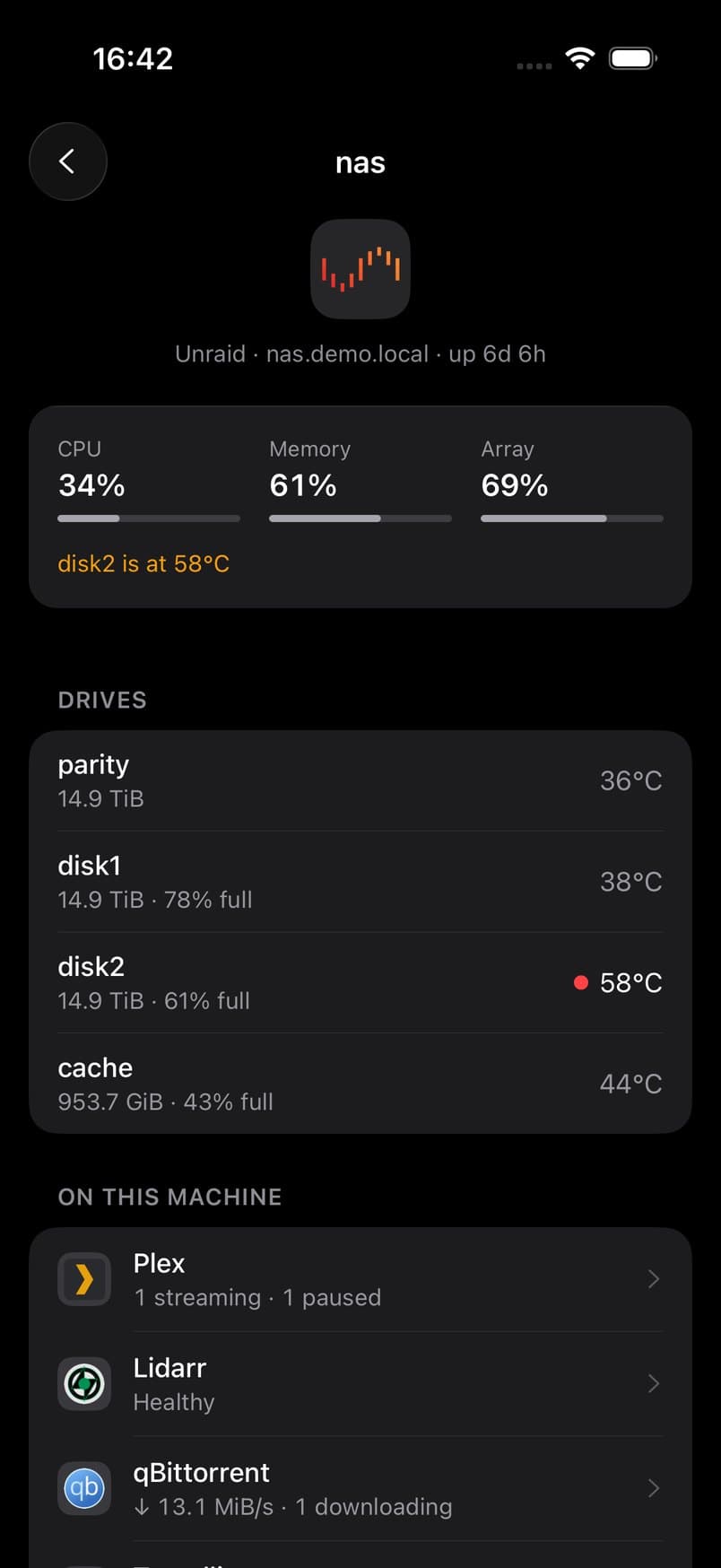
Six ways to lay it out
- TriageOnly what needs you. Everything healthy folds away.
- PipelineA request followed all the way to the sofa.
- MachinesYour stack grouped by the box it runs on.
- GlanceEvery service on one screen, as icons.
- The mixNeeds you, the pipeline and your machines in one scroll.
- ClassicEvery service as a tile, exactly as it is today.
QM Reader
Your books get a world of their own.
QM Reader is a third world, next to Entertainment and the Command Centre. It reads from BookOrbit and Grimmory and puts titles from both into one library. Don't run a book server? Switch it off in Settings and it's gone.
- A proper reader
- EPUB and PDF open in a native reader: paged or scrolling, your own text size and spacing, themes down to true Black, and fonts including OpenDyslexic.
- Audiobooks
- BookOrbit audiobooks play with speed, a sleep timer and chapters. A mini player follows you round the app, playback carries on in the background, and your place syncs back to BookOrbit.
- Find the next one
- Add your own Hardcover key for trending books, charts and new releases, then request through BookOrbit by title, ISBN or author.
- The rest of the shelf
- Collections, series and read status from both servers, plus star ratings, highlights, notes and reading stats from BookOrbit.

New ways to hear from your stack.
The alerts you already have stay as they are: push through the relay, instant alerts through your own ntfy or Pushover, and local alerts on the device. 1.3 adds these.
- Alerts from your own server
- With Pro, pair your phone with QM Companion and your server sends the alerts itself, with the wording and rules you choose. It needs Companion 0.1.7 or later.
- Power alerts
- PeaNUT tells you when a UPS switches to battery, runs low, stops reporting or comes back. The checks run in the background when iOS allows, so they aren't instant.
- Uptime Kuma, down and up
- With Pro, a Kuma webhook sends a push the moment a monitor goes down, and another when it's back.
- Told when push is broken
- If notifications can't reach this device, or a service still points at an old push address, the Notifications screen says so and shows the fix.
Five new connections.
They join the 59 services already in the app, which makes 64 when 1.3 reaches the App Store.

Grafana
Browse your dashboards with an optional Viewer token, or open the full Grafana web app inside Quartermaster.

Uptime Kuma
Monitor status, response times, certificate warnings and uptime. With Pro, down and up alerts through a Kuma webhook.

PeaNUT
Your UPS: status, battery and load, with an opt-in alert for when it switches to battery.

Pulsarr
Approve or reject requests, and manage rolling shows.

Grimmory
Your library, series, shelves and read status, and a source for QM Reader.
And the smaller things.
- A slider between worlds
- Drag the slider at the top of Home to move between worlds, with a preview of each world's Home as you go. On iPhone and iPad; the Mac keeps its sidebar.
- Tabs with one job each
- Entertainment's tabs become Home, Movies, Shows, Discover and Search. Stack, Stats, Downloads, Containers and the Doctor move over to the Command Centre. For You can be added back.
- Open the app where you want
- Where you left off, or always in one world. A tester asked for this one.
- Easier at large text sizes
- Long names glide across after a moment instead of being cut short, and short labels wrap onto two lines. You can turn it off.
- The Mac gets all of it
- The new Home, the layouts and the wizard come to the Mac too, inside the sidebar it already has.
The beta is closed, and full.
Every tester place for 1.3 is taken. If you already use Quartermaster with Pro and want in when places open up, say so in the Discord or email [email protected]. Everyone else gets 1.3 from the App Store as a normal update once testing is done.
This page describes the beta build. Details can still change before release, and this page will be updated if they do.
On the App Store today: 1.2.
Watch from Jellyfin, Emby and Plex without leaving the app, run it on your Mac, and give the household their own way in with Family. The 1.3 update lands on top of all of it.
Download on theApp StoreMore on 1.3: choosing a Command Centre layout and why books got their own world.